

🔌 Introduction
Telegram has grown into one of the most popular messaging apps in the world since its launch in 2013. Built on promises of speed, privacy, and freedom, it’s attracted millions of users globally. But the real question remains: Is Telegram truly safe to use?
In this article, we explore Telegram’s privacy practices, encryption model, security weaknesses, and how you can use it safely.
🌐 What is Telegram?
Telegram is a cloud-based messaging app created by Pavel and Nikolai Durov. It offers fast messaging, massive group chats (up to 200,000 members), file sharing, stickers, bots, and voice/video calls. But unlike other messaging apps, it markets itself heavily on privacy and freedom of expression.
🔒 Encryption: What You Need to Know
Telegram uses two modes of encryption:
✅ Standard Cloud Chats
- Not end-to-end encrypted.
- Messages are encrypted between your device and Telegram’s servers.
- Telegram stores your data in the cloud, split across multiple jurisdictions for added security.
❓ Secret Chats
- End-to-end encrypted.
- Messages never touch Telegram’s servers.
- Comes with features like screenshot alerts, message forwarding restrictions, and self-destruct timers.
Important: Secret Chats are not enabled by default. You must manually start one to benefit from end-to-end encryption.
💾 Telegram as a Cloud Chat Service
While Telegram looks and feels like a messaging app, it’s also a cloud storage platform for chats, media, and files. This provides convenience, allowing you to log in from multiple devices—but it also means your data lives on Telegram servers (unless you use Secret Chats).
⚖️ Telegram’s Custom Protocol: MTProto
Telegram uses its own encryption protocol called MTProto. Its second iteration (MTProto 2.0) uses the more secure SHA-256 function and addressed earlier criticisms.
Although proprietary, it’s held up reasonably well under scrutiny—but it’s not as widely vetted as other open-source protocols used by apps like Signal.
📊 What Data Does Telegram Collect?
According to its privacy policy, Telegram collects:
- Your IP address
- Device info
- Contact list
- Username & phone number
Telegram retains metadata (not message content) for up to 12 months to help prevent spam and abuse. This includes your contact list, even if they never join Telegram themselves.
💳 Telegram’s Business Model & Data Monetization
Telegram claims to not sell user data or use it for ads. It is mostly funded by Pavel Durov and investors. A Telegram Premium plan was introduced in 2022, offering extra features like faster downloads and larger file uploads.
So far, no ads or monetization through data sales have been confirmed.
🚫 The Dark Side of Telegram
Telegram’s privacy model and lack of content moderation have made it a haven for illegal activity, including:
- Scamming and phishing
- Hacking tools and malware distribution
- Child pornography and copyright violations
- Coordination of riots and protests
Countries like Russia, China, Iran, and Pakistan have even banned the app at times for security concerns.
✉️ How to Request Your Telegram Data
Thanks to GDPR, you can request and download a copy of your data:
- Search for @GDPRbot in the Telegram app.
- Install the Telegram desktop app.
- Request your data from the bot.
- In the desktop app, go to Settings > Advanced > Export Telegram Data.
Data will be available for download after 24 hours.
🔧 Top Telegram Privacy Tips
✔️ 1. Enable Secret Chats
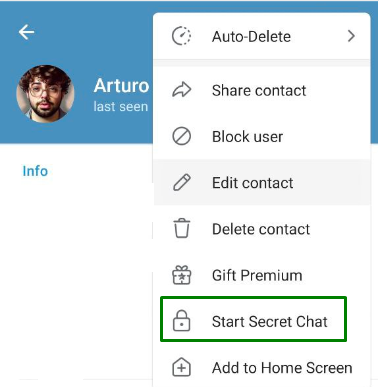
To protect your messages, start a Secret Chat from the contact’s profile. This enables:
- End-to-end encryption
- Self-destructing messages
- Screenshot alerts
✔️ 2. Activate Two-Step Verification
Go to Settings > Privacy and Security > Two-Step Verification and create a password. This helps prevent account hijacking.
✔️ 3. Auto-delete Messages
Set messages to auto-delete by going to a chat > ⋮ > Auto-Delete.
✔️ 4. Customize Privacy Settings
Head to Settings > Privacy and Security to control:
- Who sees your phone number
- Who can call you
- Who can add you to groups
✔️ 5. Use a VPN for Extra Anonymity
Using a VPN (like NordVPN) hides your IP address and helps you access Telegram in regions where it is banned.
📄 Telegram vs WhatsApp: Which Is Safer?
- Privacy: Telegram wins, especially with its no-ads promise and large community features.
- Encryption: WhatsApp wins by offering end-to-end encryption by default.
For casual users, WhatsApp with a VPN might offer better overall security. But for large group chats and privacy customization, Telegram shines.
❓ Are There Safer Alternatives to Telegram?
If security is your #1 priority, consider switching to:
- Signal: Open-source, end-to-end encrypted by default, and minimal data collection.
- Session: A decentralized messenger with no phone number required.
🚫 Final Thoughts: Is Telegram Safe?
Telegram provides impressive features and flexibility, but its default chat mode lacks end-to-end encryption, and its metadata collection raises concerns. It is a powerful tool, but like any online platform, your privacy depends on how you use it.
To stay safe:
- Stick to Secret Chats
- Lock down your settings
- Use two-step verification
- Avoid sketchy public groups
- Use a VPN when necessary
📉 If used properly, Telegram can be safe. But don’t take its privacy promises for granted—be proactive and stay informed.
0 comments